Native macOS app · Version 2.0 · Apple silicon

49 developer features. Plus MCP inspection, reusable skills, and standards-compliant JSONPath.

  • MCP Inspector for inspecting servers, capabilities, tools, and responses locally
  • AI Developer Library for skills, agents, prompts and rules for AI-assisted development
  • 48 local tools, including RFC 9535 JSONPath and semantic structured diff

Free trial: 7 days of actual use days you open the app, not calendar days.

macOS 15 or later · one-time purchase, no subscription · licence never expires
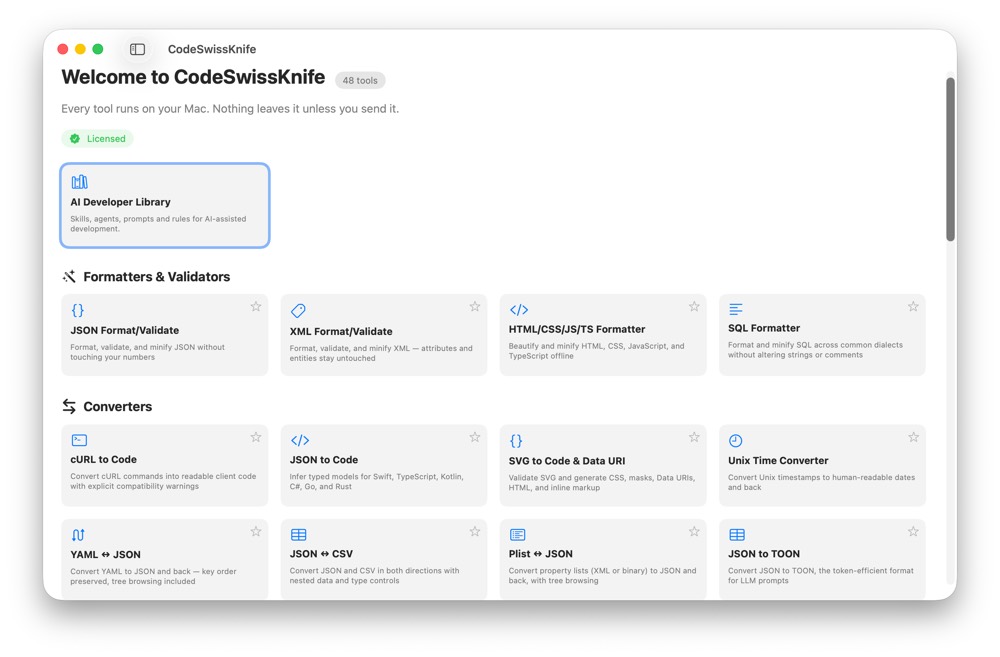
The CodeSwissKnife main window: a searchable sidebar of every tool, and the Home grid with the AI Developer Library above categories for formatters, converters, encoders, generators and inspectors.
49 features included Nothing leaves your Mac unless you send it No account required From $29.99 once

Used by individual developers from these organizations

Apple Amazon Amazon Web Services Google Meta Microsoft SpaceX Tesla
AI Developer Library

Every SKILL.md you ever wrote, in one place

Every project leaves something behind: a SKILL.md you tuned for weeks, the review prompt that finally worked, the AGENTS.md rules you wrote once and never found again. Point the AI Developer Library at a project folder and it collects them, Claude, Codex and Cursor conventions included, reading the YAML frontmatter for the title, summary and tags.

Duplicates are matched by content rather than filename, so the same skill copied across five repositories is stored once. Anything that looks like a credential is flagged before it is saved. Search covers titles, tags and full text, and the library keeps working even without a licence: what is inside it is yours.

MCP Inspector

Read a server before you trust it

Model Context Protocol servers are quick to add and hard to audit. Paste a recorded JSON or JSONL transcript and the Inspector validates it against a chosen MCP revision, showing negotiated capabilities, the advertised tools, resources and prompts, and every protocol error with the line that caused it.

The optional live connection is read-only by construction: it initializes the endpoint and lists what the server advertises. It never invokes a tool, never reads a resource, never starts a process. Exported transcripts have likely credentials redacted.

HTTP Client

Run a .http file without opening an editor

The REST Client format you already write in VS Code, with ### separators, headers, and @variables with {{placeholder}} substitution, runs here as it is. A ▶ in the gutter sends the request on that line. It closes a loop the app already had half of: cURL to Code has always emitted these files.

The session is ephemeral by design: no cookie jar, no cache, no history. A connection test that quietly replays yesterday's session cookie is a connection test that lies. Unresolved placeholders stay visible in the request rather than being silently dropped, so a request showing {{token}} explains its own 401.

Offline by design

Nothing leaves your Mac unless you send it

Decoding a production JWT on a website means handing that token to a stranger. CodeSwissKnife runs every transformation on your Mac: no account, no upload, no telemetry, no backend to trust. There is no backend at all. Even the Network tools stay local: they are arithmetic on the addresses you type, and never open a connection.

Requests reach the network only when you ask for one, and there are exactly three ways to ask: the HTTP Client sends the request you wrote when you press Send, the MCP Inspector's Live Connection contacts the address you type into it, and the update check can be switched off. Nothing else leaves this Mac, and no request is kept after you close the app.

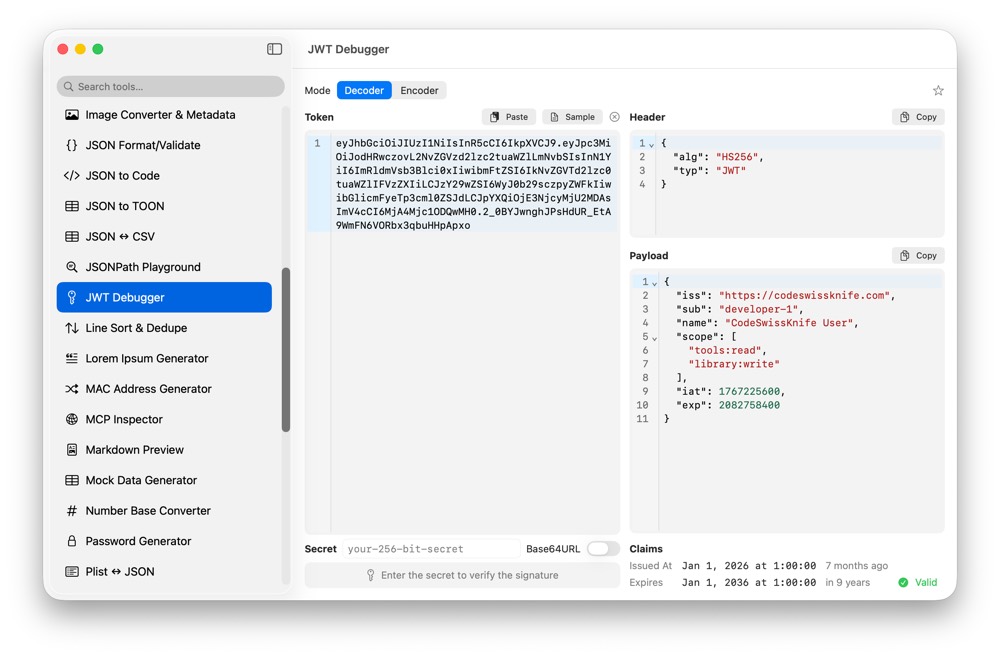
The JWT Debugger with a token decoded locally: the header and payload are shown as formatted JSON, and the claims bar reports the issued and expiry dates with a valid signature.

What's in the box

48 tools, grouped the way they are in the app. See every screenshot.

One-time purchase

Every tool included. No subscription. The licence never expires.

Basic
$29.99
1 Mac
  • Every tool included
  • Free updates via Sparkle
  • 30-day money back
Buy Basic
Personal Most popular
$39.99
2 Macs, desktop and laptop
  • Every tool included
  • Free updates via Sparkle
  • 30-day money back
Buy Personal
Business
$99.99
5 Macs, one team
  • Every tool included
  • Company invoice included
  • 30-day money back
Buy Business

Try it first: 7 days of actual use, all 48 tools unlocked. No card, no account.

Stop pasting your data into random websites

CodeSwissKnife 2.0 · macOS 15 or later