String and Unicode Inspector
How to Inspect Unicode Strings Locally on your Mac
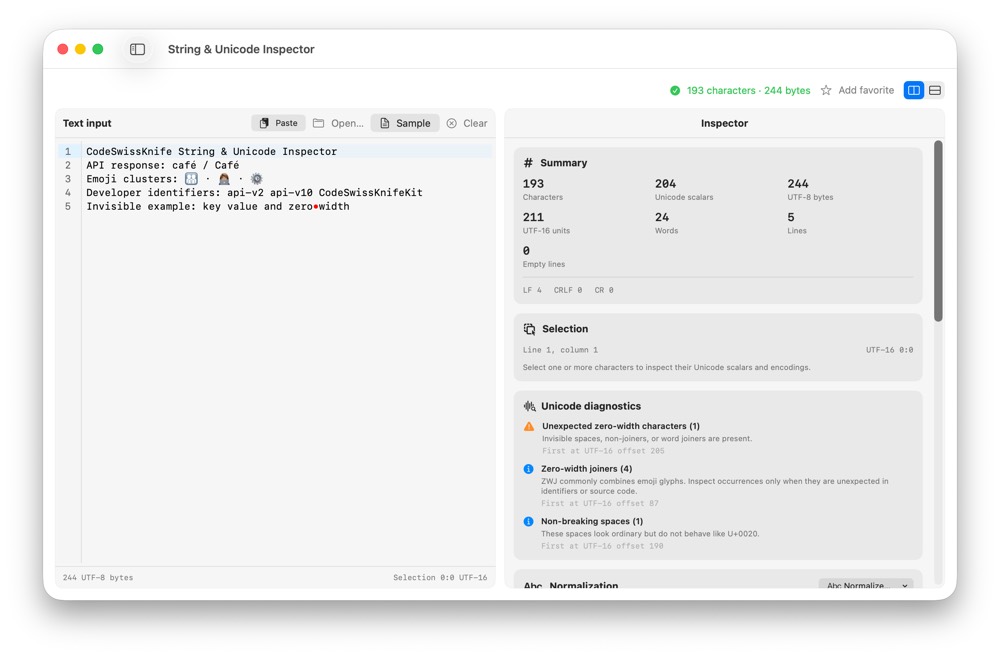
String bugs often hide in invisible characters, Unicode scalars and encoding differences. CodeSwissKnife inspects strings locally, including code points, grapheme clusters and length details.
Why inspect strings locally?
Strings copied from logs, user input or production data can be private. A local inspector keeps the sample on your Mac.
See Unicode details
Inspect grapheme clusters, Unicode scalars, UTF-8 details, invisible characters and length values that are easy to miss by eye.
Use with escaping tools
Pair String and Unicode Inspector with String Literal Escape/Unescape, URL Encode/Decode and Hex to Text Converter when a string changes across formats.
Use String and Unicode Inspector offline on macOS
Download CodeSwissKnife to keep this inspector or debugger and the rest of your developer workflow tools local on your Mac.