Copied API key not working? Check for invisible characters
Your request gets a 401, but the key you pasted looks correct. Before you regenerate it, check whether the copied string contains a character you cannot see.
Two strings that look the same
Here is a fictional API key. The second value contains \u200b between the hyphen and demo123. Python interprets that escape as U+200B, a zero-width space.
expected = "sk-demo123"
copied = "sk-\u200bdemo123"

print(expected == copied)             # False
print(copied.encode("utf-8").hex(" "))
# 73 6b 2d e2 80 8b 64 65 6d 6f 31 32 33
The extra bytes are e2 80 8b. On screen, the two values may look identical; as byte sequences, they are different. The Unicode Standard identifies U+200B as ZERO WIDTH SPACE, a character with no visible width.
An authentication failure does not prove this is the cause. It is one quick hypothesis to test when a copied credential fails but a newly typed value works.
Where hidden characters come from
A zero-width space is the clearest example, but it is not the most frequent one. In practice, the extra character is often added by the path the key takes: a file, a shell command, a document or a chat message.
A trailing newline
echo "sk-…" > key.txt writes a line break after the key. Python's open().read() and Node's fs.readFileSync() keep it, so the value ends in \n. echo "sk-…" | base64 for a Kubernetes secret encodes it too.
A Windows line ending
A .env file saved with CRLF line endings can leave a carriage return (\r, U+000D) at the end of each value, for example when a shell script sources the file.
A non-breaking space
Web pages, PDFs and rich text documents may use U+00A0 instead of a regular space. In Authorization: Bearer <token>, it looks normal but is not the separator the server expects.
A byte order mark
Some editors save UTF-8 files with a BOM: U+FEFF, the bytes ef bb bf. If the key is alone in a text file, the value you read can start with it.
A look-alike or hidden hyphen
Typography can replace the hyphen-minus (U+002D) with a hyphen (U+2010) or a non-breaking hyphen (U+2011). A soft hyphen (U+00AD) is usually not displayed at all.
A break inside the key
Long tokens wrap in PDFs, emails and documentation. Selecting across the wrap can insert a space or a line break in the middle of the value.
Inspect the copied value on your Mac
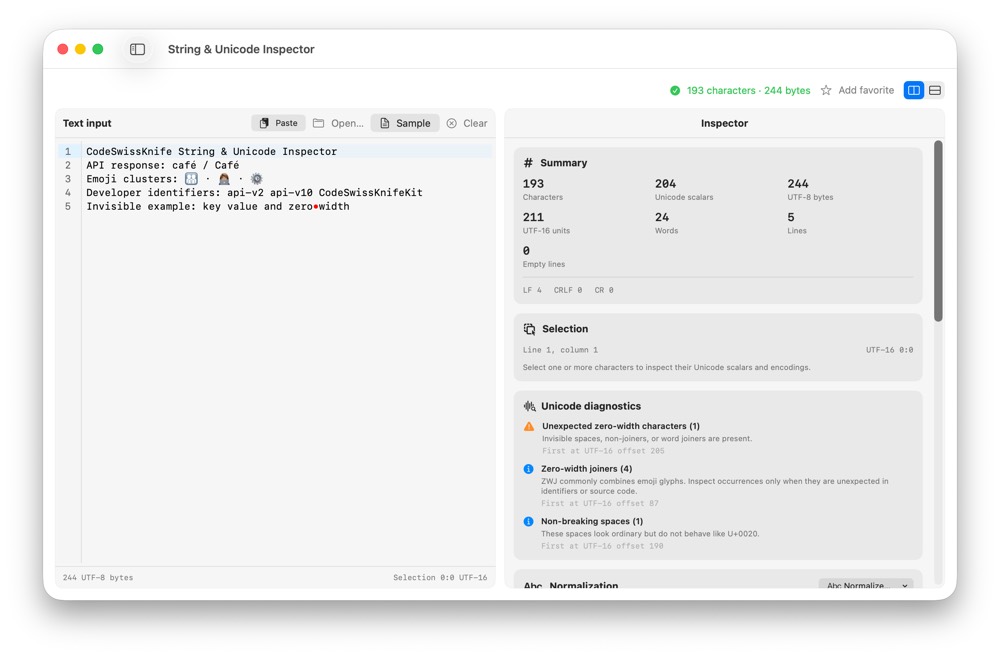
- Open String and Unicode Inspector in CodeSwissKnife.
- Paste the value you copied. Inspect its Unicode scalars or code points, especially near the beginning, end and any line break.
- Look for unexpected values such as
U+200B, a newline (U+000A), a carriage return (U+000D), a regular space (U+0020), a no-break space (U+00A0), a soft hyphen (U+00AD) or a byte order mark (U+FEFF). - Compare the characters with the format your provider documents. Do not assume that every non-ASCII character is an error; the provider defines the valid format.
For another view, this small Python check prints code points from a test string without revealing a real key:
sample = "sk-\u200bdemo123"
print(" ".join(f"U+{ord(ch):04X}" for ch in sample))
# U+0073 U+006B U+002D U+200B U+0064 ...
Keep real credentials out of shared terminal logs, issue reports and screenshots. If you inspect a real key, keep the check local and remove the value afterward.
Check from Terminal
macOS already includes the tools for a byte-level check. With a fictional value, the output looks like this:
printf 'sk-\xe2\x80\x8bdemo123\n' | xxd
# 00000000: 736b 2de2 808b 6465 6d6f 3132 330a  sk-...demo123.
xxd prints every byte in hexadecimal. e2 80 8b is the zero-width space, and 0a at the end is a newline. To check what is on your clipboard, run pbpaste | xxd.
That command prints the whole value, which you do not want for a real key. Remove every visible ASCII character first, so only the suspicious bytes remain:
pbpaste | LC_ALL=C tr -d '!-~' | xxd
printf '%s' "$API_KEY" | LC_ALL=C tr -d '!-~' | xxd

# With the fictional value above:
# 00000000: e280 8b0a                                ....
tr -d '!-~' deletes the printable ASCII range from ! to ~. Spaces, tabs, line breaks and every non-ASCII byte stay. If the output is empty, the value contains only visible ASCII characters. Treat this output as sensitive; do not share it.
For a configuration file, check for Windows line endings and a byte order mark without printing any value:
LC_ALL=C grep -c $'\r' .env   # number of lines that contain \r
head -c 3 .env | xxd          # "efbb bf" means the file starts with a BOM
Fix the source, not every credential
If you find an accidental character, copy the key again from its original source or regenerate it through the provider. For a key embedded in a configuration file, replace the affected value and retry with the same environment and request.
- Copy from the provider's dashboard with its copy button rather than a manual selection, especially when the key wraps across lines.
- Write secrets without a trailing newline:
printf '%s' "$KEY" > key.txtorprintf '%s' "$KEY" | base64instead ofecho. - Save
.envand key files with LF line endings and as UTF-8 without a BOM. Most editors show both settings in the status bar.
Avoid silently stripping or normalizing every credential in application code. Credentials are exact strings; automatic cleanup can hide a broken copy path or change a valid value. Use the inspection result to correct the specific source of the mistake.
If the key still fails
Check the provider's authentication instructions: the expected header or prefix, the environment, the key's scope and whether it has expired or been revoked. A 401 can have several causes, and a 403 may indicate an authorization problem even when the credential is recognized.
Frequently asked questions
Why does my API key work in curl but not in my app?
The two are probably not sending the same bytes. A key typed into a terminal command usually has no trailing newline, while a key read from a file, a secret or a .env loader may end in \n or \r. Compare the length of both values, or check the value your app reads with the filtered Terminal command.
How do I see hidden characters in a string on a Mac?
Paste the string into CodeSwissKnife's String and Unicode Inspector to see every code point, or run pbpaste | xxd in Terminal to see every byte. For a real credential, prefer the filtered command that shows only non-visible and non-ASCII bytes.
Should my code trim whitespace from API keys?
Removing a trailing newline where you read a secret file is a reasonable, explicit choice. Broader cleanup, such as removing every non-ASCII character or normalizing Unicode, can hide the real problem and alter a value that was valid. Fix the source when you can.
Can an invisible character cause a 401 Unauthorized error?
Yes. The server compares the exact bytes it receives, and one extra byte at the start, at the end or in the middle is enough for the key to be rejected. Some HTTP clients refuse to send a header that contains a line break or a non-ASCII character, so you may see a client-side error instead of a 401.
See every character before the next request
CodeSwissKnife's String and Unicode Inspector shows code points and encoding details locally on macOS. The tool guide explains its other uses, including grapheme clusters and string lengths.