How to format and validate XML locally on your Mac
XML still shows up in app manifests, property-list workflows, SOAP integrations, feeds, build files and vendor APIs. CodeSwissKnife gives you a local XML formatter and validator for macOS, so you can inspect structure without sending documents to a web tool.
Why format XML locally?
XML documents can contain API credentials, customer identifiers, internal service names or deployment settings. A local formatter keeps that content on your Mac while still making the document readable.
That matters for build files, plist-adjacent workflows, integration payloads and support tickets where the document is sensitive even when the format is old.
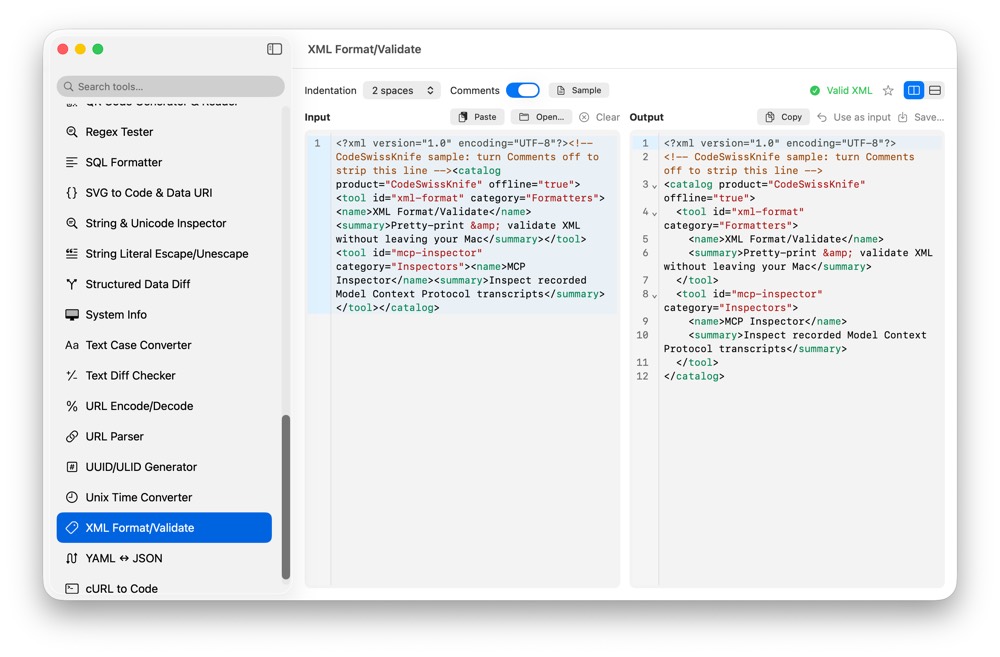
Format dense XML into readable structure
XML Format/Validate turns compact or messy XML into indentation that makes element nesting visible. That is usually the difference between guessing where a node belongs and seeing the document shape immediately.
Use it when inspecting feeds, request bodies, manifests, exported settings or XML snippets copied out of logs.
Catch malformed XML before it reaches code
Validation helps catch broken tags, invalid nesting, unclosed elements and syntax issues before a document is committed, sent to an API or fed into a parser.
The app uses the same visual status language as the rest of CodeSwissKnife: a clear valid state when the input parses, and readable error feedback when it does not.
Preserve attributes and document details
The formatter is token-based and preserves attributes verbatim. That is important when attribute ordering, quoting style or exact text matters during inspection and review.
Formatting should make XML easier to read, not silently rewrite meaningful details while you are trying to debug a payload.
Use XML formatting beside the rest of your local toolbox
XML Format/Validate sits with JSON formatting, SQL formatting, plist conversion and structured diffing in the same native app. You can move between related inspection tasks without uploading content to separate sites.
For property-list work, pair it with Plist to JSON. For semantic comparisons, use Structured Data Diff.
Use an offline XML formatter for macOS
Download CodeSwissKnife to format, validate and inspect XML locally alongside your JSON, plist and developer workflow tools.