How to format and validate JSON locally on your Mac
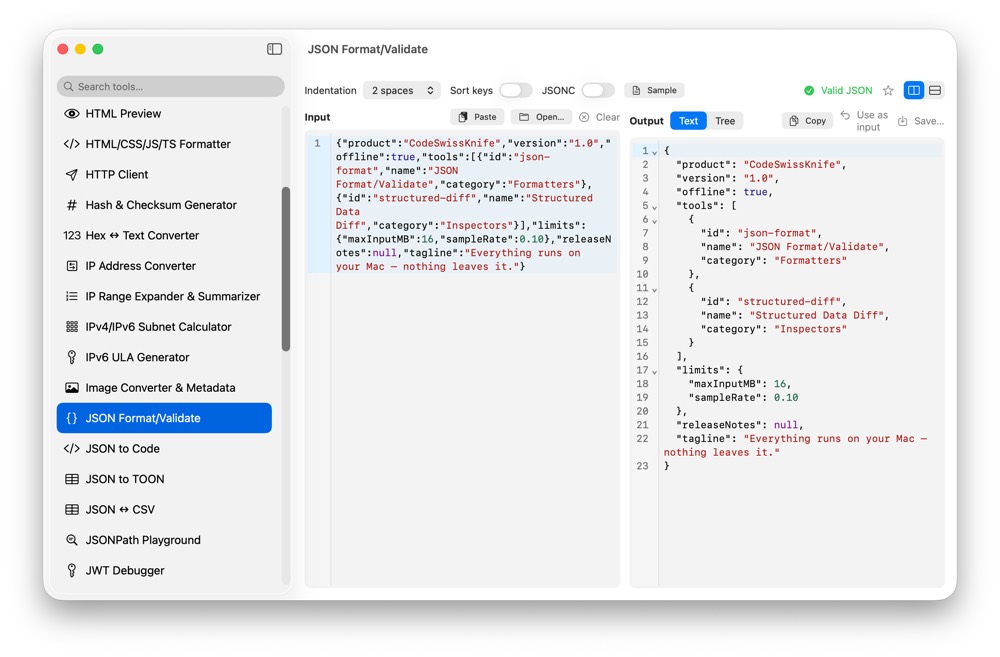
JSON payloads often include tokens, customer data, internal ids or production configuration. CodeSwissKnife gives you a native JSON formatter and validator for macOS, so you can clean, inspect and minify JSON without uploading it to a random website.
Why format JSON locally?
JSON is frequently copied from API responses, logs, webhooks, JWT payloads and configuration files. That content can contain secrets or business data, even when it looks harmless at first glance.
A local formatter keeps the transformation on your Mac. No upload, no account, no backend processing step just to make a payload readable.
Format, minify and sort when it helps
Use JSON Format/Validate to turn dense payloads into readable indentation, or minify formatted documents when you need compact output for fixtures, requests or configuration values.
When you need deterministic output, sorting keys can make reviews and comparisons easier. When order matters for inspection, keep the original object-member order.
Validate before using a payload
A JSON formatter should also tell you when the input is not valid JSON. Validation catches missing commas, unclosed strings, trailing fragments and malformed structures before the payload reaches code, tests or a request body.
CodeSwissKnife also supports JSONC workflows where comments need to be handled intentionally rather than pasted into a strict JSON parser by mistake.
Inspect JSON as structure, not only text
Pretty-printed JSON is easier to read, but structure matters too. Tree-style inspection helps you understand nested objects and arrays without manually scanning a long document from top to bottom.
For extraction work, use JSONPath Playground. For comparing two payloads, use Structured Data Diff.
Preserve the details that matter
CodeSwissKnife's JSON-family tools share a fidelity-first token stream. Numeric scalars are preserved verbatim, so a value such as 0.10 does not silently become 0.1. Object-member order is preserved unless you explicitly choose to sort keys.
That matters when JSON is not just sample data, but a fixture, a signed payload, a test case or a production artifact you need to inspect carefully.
Use an offline JSON formatter for macOS
Download CodeSwissKnife to format, validate, minify and inspect JSON locally alongside the rest of your developer tools.